The W3C naive CMYK-to-RGB formula converts four ink percentages into a single screen color using the equation channel = 255 × (1 − min(1, ink × (1 − K) + K)), where the ink is cyan for red, magenta for green, and yellow for blue. A browser-based implementation of this formula lets designers, marketers, and developers preview an unprofiled CMYK recipe as an 8-bit RGB triplet, a six-digit hexadecimal value, and a visual swatch without installing desktop software. That covers the first leg of a CMYK to RGB to Pantone workflow — turning process ink percentages into the closest naive screen approximation. Pantone spot colors live one step further along: they are a proprietary matching system backed by physical swatch books and licensed software, and the cleanest way to use them with a browser preview tool is to look up the CMYK recipe published in a Pantone guide and then run those four numbers through the calculator. Knowing exactly where the approximation ends and where Pantone requires its own tooling is what keeps the workflow honest for both screen and print teams.
What Each Piece of "CMYK to RGB to Pantone" Actually Does
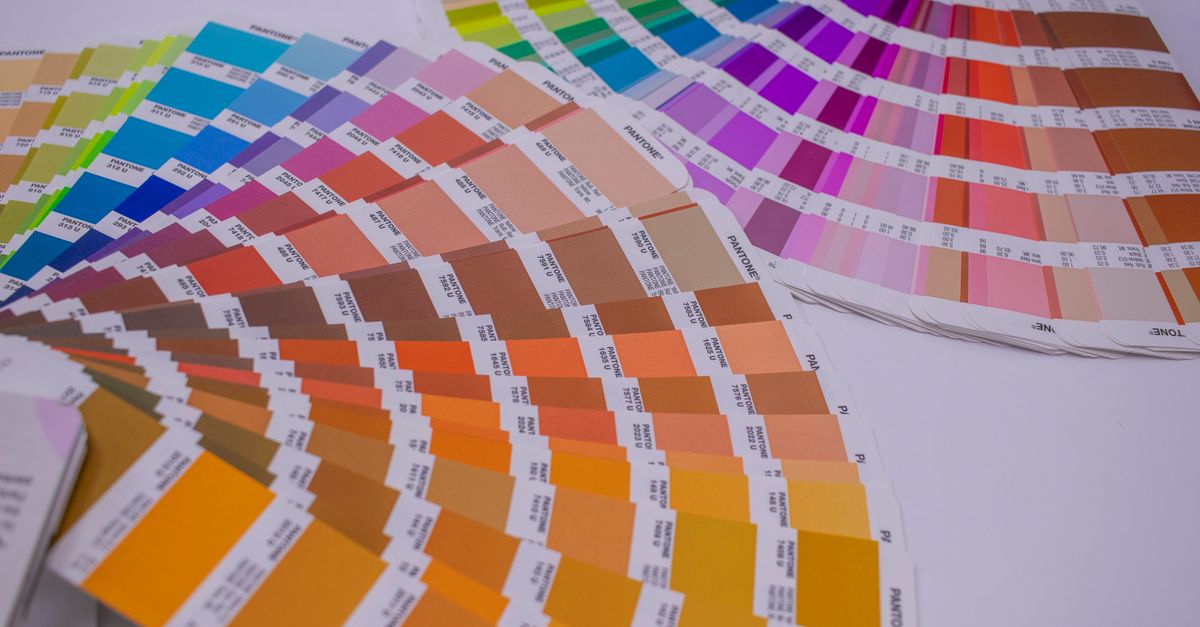
A CMYK to RGB to Pantone workflow is three different color worlds, each with its own job to do. CMYK describes process printing with four percentages — cyan, magenta, yellow, and black — that the press mixes as ink dots on paper. RGB describes light-emitting displays with three 8-bit channels (red, green, blue) that combine additively on a screen. Pantone, often abbreviated PMS for Pantone Matching System, describes a spot color by an alphanumeric code such as "Pantone 185 C," reproduced by the printer from a premixed ink rather than a four-color build.
The three systems are not interchangeable in any strict mathematical sense:
- CMYK is device-dependent — the press, ink set, paper, dot gain, and rendering intent change the printed result.
- RGB is also device-dependent — every monitor and phone screen has its own gamut, white point, and brightness.
- Pantone is a fixed recipe system built around physical reference books and licensed libraries that fix a single target per code.
The realistic interpretation of "CMYK to RGB to Pantone" in a browser context is therefore a two-stage lookup: feed CMYK percentages into a calculator to preview the screen color, then cross-reference a Pantone code against the CMYK build printed in a Pantone fan deck. That separation is the foundation this article builds on, and it is the reason a single browser tool cannot honestly output all three at once.
How to Convert CMYK to RGB and Check a Pantone-Like Result
The browser step in a CMYK to RGB to Pantone workflow is fast because it does only one job. The CMYK to RGB tool reads four percentage sliders, applies the W3C naive formula, and shows you the result on screen. The exact procedure is below.
- Open the CMYK to RGB tool in your browser so all four sliders and the live swatch are visible.
- Set cyan, magenta, yellow, and black to the percentages you want to preview — from a Pantone fan deck, from a printer's recipe, or from your own art.
- Read the red, green, and blue channels (each between 0 and 255) and the six-character hex value the page displays next to the swatch.
- Copy the hex code or the RGB triplet into your screen mockup, CSS file, email design, or slide deck.
- Label the swatch as an "approximate on-screen preview" in any handoff so the next person does not mistake it for a Pantone match or a press target.
For Pantone specifically, you can flip the workflow around: open a Pantone fan deck (or a Pantone library in your design tool), find the closest Pantone code for the CMYK build you already have, and only then use the screen RGB or hex from the browser preview to communicate intent to a screen designer. The browser does the screen math; the Pantone book does the spot color identification. Skipping the Pantone book is the most common way this kind of workflow produces a wrong swatch.
Worked example with C = 0%, M = 100%, Y = 100%, K = 0%:
- Red channel = 255 × (1 − min(1, C × (1 − K) + K)) = 255 × (1 − min(1, 0 × 1 + 0)) = 255 × 1 = 255
- Green channel = 255 × (1 − min(1, M × (1 − K) + K)) = 255 × (1 − min(1, 1 × 1 + 0)) = 255 × 0 = 0
- Blue channel = 255 × (1 − min(1, Y × (1 − K) + K)) = 255 × (1 − min(1, 1 × 1 + 0)) = 255 × 0 = 0
The tool's documented endpoint for this exact combination is rgb(255, 0, 0) — bright screen red, written as #FF0000. Any naive calculator following the W3C fallback should give the same answer for this input.
Where a Browser CMYK-to-RGB Tool Fits in a Pantone Workflow
A browser CMYK-to-RGB approximation is most useful when you need to do something the Pantone book itself cannot do — turn four CMYK numbers into an immediate screen color. It works well for the following tasks.
- Sketching a UI, web mockup, or social card from a print recipe without opening a profile-aware design tool.
- Showing a colleague the rough screen equivalent of a Pantone-derived CMYK build during an early conversation.
- Deciding whether a printed swatch and a screen swatch will visually clash before anyone commits to a physical proof.
- Pulling a quick hex code for an email or slide deck while the final Pantone choice is still being negotiated with a printer.
The same tool is not useful, and should not be used, for the following tasks.
- Converting an arbitrary Pantone code into CMYK — Pantone fan decks or Pantone-licensed libraries are the source of truth for that direction.
- Generating a press-ready CMYK build from an arbitrary RGB color picked on screen.
- Validating a brand color against a Pantone standard for contractual sign-off.
For those tasks, the honest path is a Pantone-licensed library or a profile-aware converter backed by the W3C device-CMYK reference, combined with the printer's output profile. The browser approximation sits between those steps as a quick communication aid, never as a substitute.
The Limits of the Naive Formula for Spot Colors
| Factor | What changes in real printing | Effect on the naive RGB preview |
|---|---|---|
| Dot gain | Midtones print darker as ink absorbs into paper | Browser shows the ink percentages as if no gain occurred |
| Ink set | Different manufacturers produce different chroma | Browser assumes a single neutral ink set |
| Paper stock | Coated vs uncoated paper absorbs ink differently | Browser ignores paper entirely |
| Rendering intent | Perceptual vs relative vs absolute colorimetric mapping | Browser applies none — only the formula |
| Pantone spot inks | Premixed inks sit outside CMYK gamut | Browser can only show the published CMYK approximation |
The naive formula is a deliberately simple fallback. It assumes an ideal CMYK device whose channels are independent and whose black plate subtracts linearly from the color inks, then it inverts each channel and scales to 0–255 with half-even tie rounding to match the W3C firebrick example. Real presses do not behave that way, and the W3C CSS Color 4 working draft that publishes the formula explicitly labels it "naive" and recommends ICC-profile-aware conversion wherever the result matters.
Pantone colors make the gap obvious because many of them are deliberately outside the CMYK gamut. A saturated Pantone like Pantone 802 (a fluorescent green) cannot be reproduced in CMYK at all, so feeding its "best CMYK approximation" from a Pantone fan deck through the naive formula will only give you a rough on-screen hint of the spot color, not the spot color itself. The deeper the saturation gap between CMYK and Pantone, the wider the visible difference will be on screen.
When to Use a Calibrated Workflow Instead
| Stage of the project | Browser CMYK to RGB | Profile-aware software |
|---|---|---|
| Early mockup, internal chat | Fast and good enough | Overkill |
| Picking a screen color from a print recipe | Reasonable starting point | Better for final picks |
| Pantone substitution sign-off | Not acceptable | Required |
| Press proof approval | Not acceptable | Required |
| Final delivery to a print provider | Not acceptable | Required, with printer's ICC profile |
A calibrated, profile-aware workflow is the right answer whenever the screen preview is going to drive a printed decision. The general procedure is: obtain the printer's CMYK output profile (usually an ICC file), assign that profile to your art in Photoshop or Illustrator, soft-proof on a calibrated monitor, and produce a physical proof before signing off. Pantone identification sits inside that workflow, not on top of it — you cross-reference the Pantone book against the chosen CMYK build at the moment of sign-off.
The browser CMYK-to-RGB approximation should be used only as a quick check during the early rounds of communication. As soon as a Pantone-versus-CMYK substitution, a press proof, or a print delivery is on the table, the conversation moves to ICC profiles, rendering intent, and a physical proof — and a naive browser formula is no longer part of the answer.
For more on the formula itself, see CMYK to RGB Explained: The Formula and Its Limits, which walks through the same channel-by-channel math in more depth.